Claude Code + Obsidian is my unfair advantage as a solo founder
The two-tool combination that lets one person ship what used to take a team. Architecture, daily workflows, and where it breaks.
I shipped a full SaaS in eight days — auth, payments, onboarding sequences, an SEO pipeline that researches keywords and publishes articles, a content admin panel, social scheduling. Alone. People ask how. The answer isn't that I work fast. The answer is a two-tool combination that most people who use each tool separately have never tried together: Claude Code and Obsidian.
This isn't a tips post. This is the actual system — the architecture, the daily workflows, the specific ways it fails — because it does fail, and understanding where is the only way to use it well.
What's Broken Without the Other
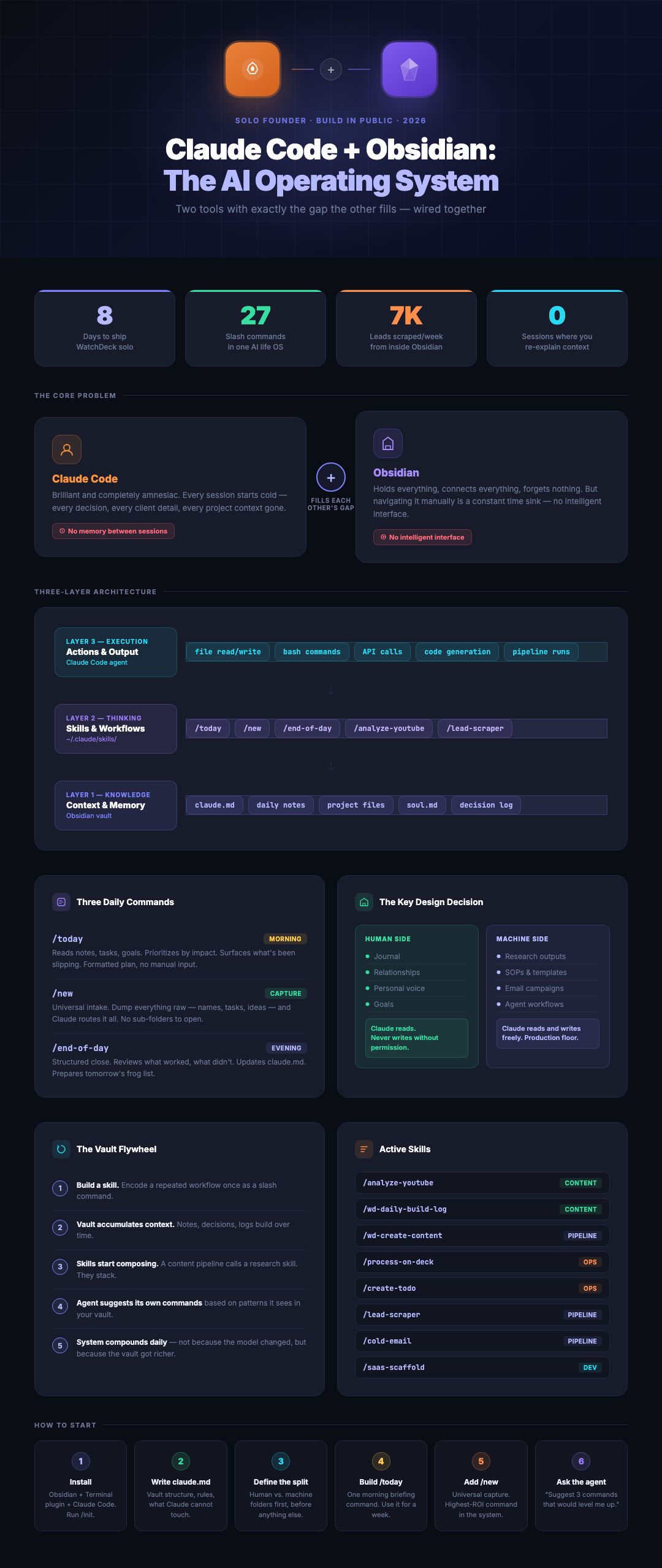
Claude Code is an amnesiac. Every session starts cold. Every decision from last week, every constraint you discovered the hard way, every bit of context about why you built something a certain way — gone. You re-explain the project. Claude does its best from a few hundred words of background. Most people hit this wall and conclude the tool is overrated. The tool isn't the problem. The context layer is missing.
The common workaround is opening Claude Code inside a specific project folder. That helps with isolation, but it creates a different problem at scale. One session knows the codebase. Another knows the client notes. A third knows the content calendar. None of them talk to each other. There's no shared context across the whole operation.
Obsidian has no hands. People who use it seriously already know they're sitting on something powerful: local markdown files, backlinks, graph view, a plugin ecosystem. The problem is that realizing the value requires constant manual overhead — filing notes, maintaining folder structure, updating wikis, making sure everything is organized enough to be findable later. You end up spending more time maintaining the system than using it.
The fix is giving each tool what it lacks. Obsidian gives Claude Code a persistent memory that outlasts any session. Claude Code gives Obsidian an intelligent interface so you can talk to your vault instead of navigate it.
Wired together correctly, the result isn't a better notes app or a faster AI assistant. It's an operating system. One window. One vault. Every session starting from the same shared source of truth.
Why You Should Build Your Own
Before the architecture, a question worth answering: why not just use a pre-built AI second brain?
There's a real security argument. Any genuinely useful AI second brain faces the lethal trifecta: the agent can read your private data, it processes external inputs that could carry prompt-injection attacks, and it has the ability to act outward — post to an API, send a message, write to a file. All three are always present in a useful system. The question is how tightly you control them.
Off-the-shelf solutions grant permissions broadly by default. They're large codebases you can't fully audit. When you build your own, you define exactly what the agent can and can't do from the start. I started everything read-only. Write access got added deliberately, one integration at a time, with explicit limits — Claude can create Gmail drafts but not send them. It can update tasks but only in certain projects.
The second reason is compounding. A system built around your actual workflows, your actual voice, your actual constraints learns from every session. A generic tool doesn't know you at all on day one, and barely knows you six months later. There's a real difference between a contractor who just walked in and a co-developer who's been there every day for three months.
The Architecture
Three layers, each with a distinct job.
Obsidian is the knowledge layer. The vault is the source of truth: every decision, every constraint, every project note, every build log entry, every piece of personal context I've documented. Markdown files, stored locally, no proprietary format. This matters more than it sounds. Markdown is the format AI reads best — not PDFs, not Google Docs, not Notion exports. When Claude Code reads a markdown file, it reads it fluently.
But what makes Obsidian a vault rather than just a folder is the inter-relationships between files. A daily note links to a project file, which links to a person file, which links to a set of ideas. Over time, the vault develops a structure that reflects how I actually think: which projects connect to which decisions, which ideas cluster together, which threads are active versus abandoned.
Skills are the thinking layer. Claude Code's skills system lets me encode workflows as slash commands. When I type /today, Claude isn't improvising — it's following a defined set of instructions that specifies exactly what to read, what to check, what to write, and where to save it. Write it once, run it identically every session.
Skills are the only abstraction you actually need. No MCP servers, no middleware. Just Claude Code plus a well-designed skill library.
Claude Code is the execution layer. Running inside VS Code or directly through a terminal in Obsidian, it reads, writes, and searches every file in the vault. It connects to external tools — calendar, email, Slack, third-party APIs — and acts across all of them without me switching windows.
The Most Important Design Decision
Before building anything, make one architectural call and make it consciously: what does Claude own versus what stays mine?
The rule I use: the human side is read-only for Claude unless I explicitly say otherwise. My journal, my daily notes, my raw brain dumps — Claude reads them to understand what's going on. It never writes to them unless I give specific permission for a specific task. The reason isn't abstract. If the agent is allowed to write freely into my personal notes, I stop being able to tell what's mine and what isn't. My voice gets diluted.
The machine side is everything else. AI-generated workflows, SOPs, templates, research outputs, campaign drafts, scripts. Claude writes freely there. It's the production floor.
The Daily Operating System
Three commands run most of the day.
/today — reads through daily notes, tasks, projects, recent build log entries, and business goals. It doesn't just list what's due — it prioritizes by impact and flags what's been slipping. Before I built this, I'd come back from a workout and spend 30 to 45 minutes writing out a prep list for the day. That time is now zero.
/new — universal capture. Every friction point in a note-taking system is a place where the system starts to collapse. /new accepts a brain dump in any form and routes everything automatically — updates the right person file, creates the right task, logs to the daily note, flags the video idea into the content folder. Done, without opening a single sub-folder.
/end-of-day — a prompted workflow that walks through what worked, what didn't, and what carries over. It asks questions rather than just accepting a dump. The output updates the daily log, prepares tomorrow's priority list, and closes the loop.
Where It Fails
This is the part people don't write about. The system fails in predictable ways.
It fails when context gets too big. If a session runs hot with too many attached files, Claude gets distracted by irrelevant detail. The fix is discipline about what a skill actually needs to read — not "load everything," but "load this, this, and this."
It fails when skills are ambiguous. If the skill says "summarize the day" without specifying the format, the output is inconsistent. Skills have to be written like code. Tight.
It fails when the human/machine split blurs. The moment I let Claude write into my personal journal "just this once," the trust breaks down and I stop being able to separate my thinking from its output.
Every failure mode traces back to the same root: the system works in proportion to how deliberately it's set up. There is no "just turn it on." There's only "make the design decisions and live with them."
Start Here
If you're going to build this, the sequence matters: 1) lock in the human/machine split, 2) write the three daily commands, 3) ship them before you build anything else, 4) add skills one at a time as specific workflows justify them.
The payoff isn't AI magic. It's leverage that compounds. On day one, the system saves an hour. By month three, it's the reason you can run three products simultaneously without a team.
Related: Build Your Own AI Second Brain, 27 Commands: The AI Life OS in Obsidian, The AI Chief of Staff.
Want to talk through something you’re working on?
I take on a small number of consulting and build engagements each quarter. If something in this piece maps to a problem you’re trying to solve, reach out.